
Skip to content

The guide

12 Browser Games to Play at Work (No Install, Mostly Text, Happy in a Background Tab)

Browser games to play at work: 12 free incremental games that run in a tab, need no install, stay quiet, and keep going while you do your actual job.

The best browser games to play at work are incremental games: free, no download, mostly text, and built to sit in a tab and make progress while you answer email. Sudoku and solitaire need your full attention for five minutes. A game like Kittens Game or Progress Knight needs ten seconds of attention every half hour, which is a much better fit for a workday.

Every pick below runs on a plain web page, and most of them look closer to a dashboard than a game. We chose them from our hand-tagged catalog of 1,600+ incremental games, checked that each official page loads, and noted for each one how much clicking it wants, whether it makes noise, and what can go wrong. Check your employer's rules first: a game that looks like a spreadsheet is still a game.

01

A Dark Room: best for a quiet story told in a plain text tab

Platform: Browser, Mobile · free

A Dark Room starts with one line: the fire is dead and the room is freezing. You stoke the fire, a stranger arrives, and the page slowly unfolds into a village, a map and a story that hits harder than a text game has any right to. On screen it is black text on white, with a few buttons. Nobody walking past will think much of it.

It is short by genre standards (our catalog records 3 to 6 hours) and it has a real ending, which makes it ideal for a slow week rather than a forever tab. The village stage is happy to wait while you work. The later map exploration wants focus, so save it for lunch.

Watch out for: It has sound. There is a "sound on" / "sound off" switch at the bottom of the page; turn it off before you start. Our catalog also records no offline progress, so closing the tab pauses it.

02

Universal Paperclips: best for one slow afternoon with nothing urgent due

Platform: Browser, Mobile · free

Frank Lantz's Universal Paperclips casts you as an AI whose only job is making paperclips. The interface is a column of numbers and buttons that would pass for an internal tool. Over three acts it turns into one of the best short stories the genre has produced, and it ends.

Pick it when you have a quiet afternoon: our catalog lists 4 to 8 hours to finish. The first act asks for a lot of manual clicking and price tweaking, then the automation takes over and you can glance at it between tasks.

Watch out for: No offline progress is recorded for it, so it only advances while the tab is open. The final act can pull you in for longer than a coffee break.

03

Progress Knight: best for first-timers who want progress without clicking

Platform: Browser · free

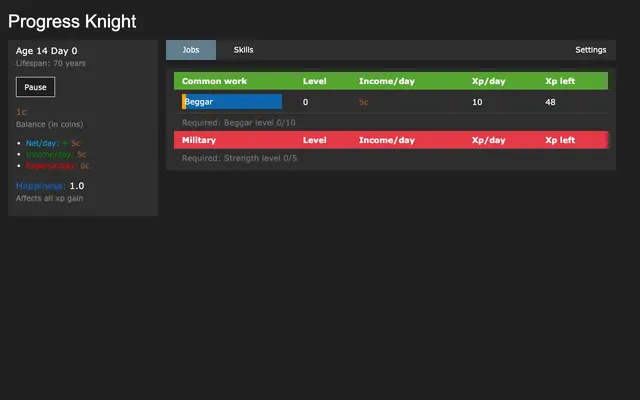
Progress Knight is a life simulator in a table. You pick a job and a skill to train, and the bars fill on their own. Your character ages, eventually dies, and comes back stronger for the next life, from beggar to knight to something much stranger.

Our catalog rates it 85% idle, one of the most hands-off games on this list. You check in, change a job or skill, and go back to work. You can play it right here without leaving the site.

Watch out for: The original repository was last updated in 2023, so expect no new content. The many mobile and fan versions are separate projects; the Android "Progress Knight: Mobile" listing is labelled "Contains ads" on Google Play.

04

Candy Box 2: best for anyone who wants it to look like a terminal

Platform: Browser · free

Candy Box 2 is drawn entirely in ASCII characters. It begins as a counter of candies you have earned, then hands you a sword, a map, quests, spells and a lollipop farm. In a narrow window it looks a lot like a log file.

It has an ending (5 to 10 hours in our catalog) and plenty of jokes. The candy count grows on its own, so the early game is happy in the background.

Watch out for: The quests are real-time fights you steer yourself, so they are not something to run during a call. Save those for a break.

05

Trimps: best for long-haul optimizers who want a permanent tab

Platform: Browser · free

In Trimps you breed small creatures, assign them jobs, and send armies through zones of increasingly mean enemies. When progress stalls you portal back to the start with permanent upgrades, then go further. The screen is resource counters and buttons, nothing flashy.

It is a months-long game with offline progress, and it is still maintained: the official repository was updated in 2025. Pick it if you want one game that lives in a pinned tab for a long time.

Watch out for: The very start asks you to click to gather food, wood and metal by hand until you can hire workers. Give it a lunch break to get going before you rely on it to run itself.

06

Space Company: best for a calm resource chain on a second monitor

Platform: Browser · free

Space Company is a classic resource-chain idler: mine metal, burn fuel for power, research, build better machines, then expand into the solar system. Everything is a number in a sidebar and a button to buy more.

It is a good middle ground between very idle and very deep. You spend a minute rebalancing production, then let it run while you work. Our catalog rates it 70% idle.

Watch out for: It is an older game (2016) with a dated layout and a slower pace than modern idlers. Power shortages can quietly stall everything while you are not looking.

07

Shark Game: New Frontiers: best for a text story that unfolds between emails

Platform: Browser · free

You are a shark. You catch fish, recruit other sea creatures, build machines and slowly uncover a mystery that spans other worlds. Shark Game: New Frontiers is a total conversion of the older Untitled Shark Game, and it is mostly text and resource lists.

On Galaxy it holds 4.7 stars from 555 ratings. It suits a workday because each new discovery arrives as a short line of text, read in a few seconds.

Watch out for: Galaxy tags it as active, so the first hours want frequent attention. Players also note that stored offline time is discarded when you move to a new world.

08

Calculator Evolution: best for programmers who want something that looks like work

Platform: Browser · free

You start with a pocket calculator and upgrade it, digit by digit, into something absurd. The progression borrows from programming, and the interface is all numbers. On Galaxy it has 4.5 stars from 922 ratings and more than 1,500 favourites.

It has four prestige layers, so there is a long road. You can play it on our site or on Galaxy.

Watch out for: Galaxy tags it as active and as a days-long game. It rewards attention more than most picks here, so it is better for slow days than busy ones.

09

Theory of Magic (Arcanum): best for fantasy readers who are fine with dense menus

Platform: Browser · free

Theory of Magic is a mage's apprenticeship told through buttons and text: study, learn spells, choose a class, explore dungeons. It has hundreds of spells and a community that has kept it going for years.

It looks like a busy dashboard, which is either perfect cover or too much, depending on your desk. Pick it if you like reading flavour text and making long-term plans.

Watch out for: The first screen is a wall of options with very little guidance. Expect to read a wiki or forum post to understand what matters.

10

Idle Loops: best for planners who enjoy writing to-do lists

Platform: Browser · free

Idle Loops is a game about planning. You queue a list of actions, the loop runs until your mana runs out, and you restart stronger with a better plan. It feels a lot like building a schedule, which is either a joke about your job or a relief from it.

The fork by omsi is the version players recommend, and it is the one we link. Once your loop is set, it repeats on its own.

Watch out for: It is idle only after you have built a good loop. A bad action list wastes the whole run, so the planning sessions need real focus.

11

Swarm Simulator: best for the most hands-off tab on a busy day

Platform: Browser, Mobile · free

Grow an alien hive: larvae become drones, drones feed queens, queens build nests, and every unit produces the unit below it. Within a day the numbers are producing numbers producing numbers.

Our catalog rates it 80% idle with offline progress, so you can close the tab for a whole meeting and come back to more. It is the least demanding game here.

Watch out for: There is no story and very little variety. If you need a reason to come back beyond bigger numbers, pick Kittens Game or Shark Game instead.

How to choose a browser game for work

Three questions sort this list quickly.

01

Match it to your screen

If people can see your monitor, stick to text: A Dark Room, Universal Paperclips, Candy Box 2, Space Company and Calculator Evolution all read as plain pages. Cookie Clicker and anything with big art is for private screens only.

02

Match it to your attention

On a busy day, pick something that runs itself: Swarm Simulator and Progress Knight barely need you. On a slow day, pick something with a story or a plan to make, like Shark Game, Idle Loops or Theory of Magic. Trimps sits in the middle and lasts for months.

03

Match it to your machine

Browser games save to the browser's local storage. Clearing site data, using a private window, or a managed work laptop that wipes profiles can delete your progress. Most long games here have an export option in their settings; copy the save string somewhere safe once a week.

Open one tab before your next meeting

Pick the game that matches your screen, open it in its own small window rather than a tab you will lose among forty others, and mute the page. Check in when you take a sip of coffee, not every time a number changes.

If you want more choice, our list of games you can play right in the browser has hundreds more, all free and tagged by how idle they are.

Browse free browser incremental games →

Common questions

What browser games can I play at work without downloading anything?

Every game in this list runs on a normal web page: A Dark Room, Universal Paperclips, Progress Knight, Candy Box 2, Trimps, Space Company, Shark Game, Calculator Evolution, Theory of Magic, Idle Loops, Swarm Simulator and Cookie Clicker. None needs an install or an account to start.

Do idle browser games keep running when I close the tab?

Some do and some do not. Games with offline progress, like Trimps, Swarm Simulator and Cookie Clicker, calculate what you earned while you were away when you reopen them. Story games like A Dark Room and Universal Paperclips simply pause. Each game's profile on our site records which is which.

Which browser games have no sound?

Text incrementals are usually silent, but not always. A Dark Room has sound with a switch at the bottom of the page, and Cookie Clicker plays effects unless you lower its volume. The safest habit is to mute the tab in your browser before you start.

Will clearing my browser history delete my progress?

It can. Most browser incrementals store the save in local storage, which is wiped when you clear site data or use a private window. Use the game's export option to copy your save as text, and keep it in a note.

Can my employer see that I am playing a browser game?

Assume yes. Work networks and managed laptops can log the sites you visit, whatever the game looks like on screen. Play on breaks, follow your company's policy, and keep personal accounts off work devices.

Sources