Skip to content

The guide

12 Idle Games to Play While Working (Quiet, Tab-Friendly, No Babysitting)

Idle games to play while working: 12 quiet picks that run in a screen strip or a tab, with how much attention each wants and what to watch out for.

The best idle games to play while working either live in a thin strip of your screen (Rusty's Retirement, Tiny Pasture, Desktop Defender) or wait patiently in a tab and catch up when you come back (Melvor Idle, Kittens Game, Evolve). What they share: no sound you need, no timers that punish you for a long meeting, and real progress from a ten-second check-in.

We picked these from our hand-tagged catalog of 1,600+ incremental games, using its idle rating (how much of the game plays itself) and offline-progress data, then checked each store or official page for platform, price and monetisation. Steam review shares are from the catalog's counts as of November 2026. If your employer has rules about games on work machines, those come first.

01

Rusty's Retirement: best for a second monitor that needs something alive on it

Platform: Steam · paid

Rusty's Retirement is one of the best-known Steam games that live at the edge of your screen. A retired robot farms a strip along the bottom (or side) of your screen while your other windows sit on top. You plant, hire helper bots, and upgrade the farm in the odd minute between tasks. Its Steam page sums it up as an idle farming sim that "sits at the bottom of your screen while you do other things".

It is 95% idle in our catalog, has a real ending (15 to 30 hours), and holds 97% positive from 14,873 Steam reviews. On Windows and macOS it is the easiest recommendation on this list: buy it once, dock it, forget it until lunch.

Watch out for: It takes a permanent strip of screen. On one small laptop display that strip competes with your actual work, so it is at its best on a second monitor.


02

Tiny Pasture: best for people who want a desk pet more than a game

Platform: Steam · paid

Tiny Pasture puts a row of small animals along the bottom of your screen. They snooze, scratch and wander while you work, and you breed and sell them for coins to fill the pasture with new kinds and colours. The Steam page promises they "have been trained not to invade your workspace".

It sits at 92% positive from 4,601 Steam reviews and runs on Windows and macOS. Pick it over Rusty's Retirement if you want something even calmer, with less to manage.

Watch out for: There is very little game here beyond collecting animals, and it has four DLC packs on Steam. Steam lists it as unsupported on Steam Deck, which does not matter at a desk but matters if you want it on the couch later.

03

Desktop Defender: best for wanting a little combat in the corner of the screen

Platform: Steam · paid

Desktop Defender is an idle auto-battler: a single tower in a corner of your screen fights off waves while you do other things. It drops gear for you to equip, and runs reset for permanent ascension upgrades.

It is a good pick if farming games bore you and you want numbers going up with some fights attached. It has 92% positive from 1,767 Steam reviews.

Watch out for: Windows only on Steam: no macOS or Linux build is listed. Combat effects in a corner can be more distracting than a farm, so test it on a quiet day first.

04

Melvor Idle: best for queueing one long task before a meeting

Platform: Browser, Steam, Mobile · paid

Melvor Idle takes RuneScape's skilling and strips it down to menus. You pick one action, say Woodcutting or Fishing, and your character repeats it, even while you are offline. There are more than 20 skills that feed each other, combat with over 100 monsters, and a bank to manage.

It fits a workday perfectly because the decision is "what should I train for the next three hours?", not "what do I click now?". It is 85% idle in our catalog and sits at 90% positive from 16,271 Steam reviews.

Watch out for: The Steam page says it requires an internet connection to play. It is paid ($9.99 on Steam), with paid expansions on top, but it states it has no microtransactions.

05

Kittens Game: best for spreadsheet brains on a second monitor

Platform: Browser, Mobile · free

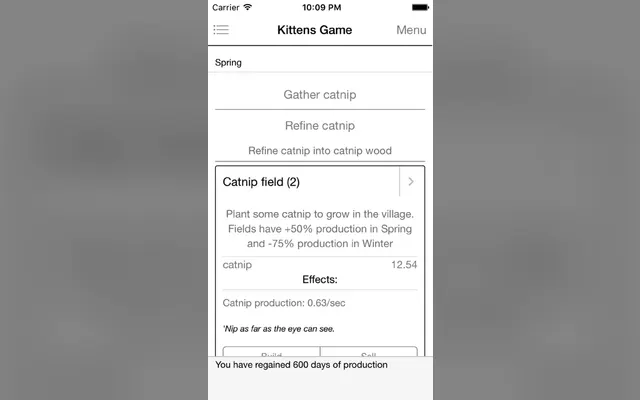
Kittens Game is a civilisation builder made almost entirely of text: catnip fields, then libraries, then space elevators, all for a village of kittens. It is deep, slow and very fond of resource tables, which is why it has lived in so many work tabs for so long.

The browser version is free. It also came to Steam in February 2026 with achievements and Steam Cloud saves, and Android has a paid version with no ads or in-app purchases listed on Google Play.

Watch out for: Storage caps fill while you are away, so a long meeting can waste production until you build more storage. Plan your caps before you walk off.

06

Evolve: best for a long-running tab you can ignore for hours

Platform: Browser, Mobile · free

Evolve starts with a single-celled organism and turns into a full civilisation game: pick traits, found a city, run an economy, then reset your species in one of many ways to start again stronger. The interface is tabs and buttons, nothing that draws the eye.

It is free, open source and still active: its GitHub repository was updated in October 2026. Offline progress is recorded in our catalog, and you can play it on our site.

Watch out for: The number of systems grows fast after the first reset. Expect to read the wiki at some point, which is not something to do on a busy day.

07

Bitburner: best for developers who want scripts running all afternoon

Platform: Browser, Steam · free

Bitburner is a cyberpunk incremental where you write real JavaScript to hack servers and automate everything. Once your scripts are good, the game plays itself, and improving them is the game. It is free on Steam with 95% positive from 7,431 reviews, and it also runs in the browser.

If your job is programming, this is the idle game that feels closest to work, for better or worse. Its source repository is updated constantly by a large group of contributors.

Watch out for: It is idle only once you have code that works. Writing that code is real focused work, so it can eat a lunch break whole.

08

Check Back: best for the most patient check-in schedule possible

Platform: Browser · free

Check Back is built around its title. You press buttons that go on cooldown, earn XP, open pet crates, and then you come back later. Its Galaxy page describes it as slow-paced and "intended to be played while doing other things", and it is tagged as a commitment of more than a month.

Our catalog rates it 90% idle. It has 4.4 stars from 557 ratings on Galaxy. Pick it if you like the idea of a game that only needs you a few times a day.

Watch out for: Some upgrades take months of rare drops, according to player comments, and the developer points players at a remake, Check Back Reclocked. It is a very slow game on purpose.

09

Unnamed Space Idle: best for sci-fi fans who want light combat in a tab

Platform: Browser, Steam · free

You fit out a ship and fight endless waves of alien ships across a sector map, with a tidy prestige loop to push further each time. It is long form and unfolds slowly, adding systems as you go.

It runs in the browser on Galaxy and as a free download on Steam, where it holds 92% positive from 4,491 reviews. The fights resolve on their own, so it is happy in the background.

Watch out for: The Steam version is free with in-app purchases. Steam lists Windows and Linux builds but no macOS build, so Mac users should play it in the browser.

10

NGU Idle: best for long workdays and a love of silly jokes

Platform: Steam, Browser · free-to-play

NGU Idle is a joke-dense RPG idler where you allocate energy and magic across dozens of interlocking systems. Beating bosses is the easy part; deciding where your resources go is the game. Its Steam page promises "hundreds of hours of content".

It holds 96% positive from 12,996 Steam reviews, one of the best ratings among long idle games. Its check-ins are short: rebalance, then leave it.

Watch out for: Free to play with in-app purchases, Windows only on Steam. The interface is crowded and the humour is crude in places, which matters if your screen is visible to others.

11

Antimatter Dimensions: best for number lovers who want automation to earn

Platform: Browser, Steam, Mobile · free

Antimatter Dimensions is the reference point for pure numbers games: buy dimensions that produce dimensions, break infinity, then break reality. It starts active, but the game hands you autobuyers as you progress, and by the middle it runs mostly on its own.

It is free in the browser and on Steam (92% positive from 4,620 reviews), and our catalog records a real ending, after 200 to 600 hours. That makes it an ideal long work companion once you are past the first day.

Watch out for: The first hours want frequent clicks before the autobuyers arrive. The Steam and mobile versions include optional in-app purchases; the browser version is the plain one.

12

Farmer Against Potatoes Idle: best for a goofy, deep grinder for long stretches

Platform: Steam · free-to-play

A farmer fights waves of potatoes with stats, equipment, classes and talents, and the systems keep stacking for a long time. It is 70% idle with offline progress in our catalog, and it has 95% positive from 8,191 Steam reviews.

It suits people who want an RPG flavour rather than a farm, and who like the feeling of a dozen counters all climbing at once.

Watch out for: Free to play with in-app purchases, Windows only on Steam. There is a lot on screen, so it is a poor choice if your monitor faces the room.

How to choose an idle game for the workday

Three things decide whether a game helps your day or hijacks it.

01

Match it to your attention

If you can spare a glance but not a decision, pick a screen-strip game: Rusty's Retirement, Tiny Pasture or Desktop Defender. If you can spare one decision an hour, Melvor Idle, NGU Idle and Check Back are built for exactly that. Bitburner and early Antimatter Dimensions need real focus, so start them on a day off.

02

Match it to your machine

A locked-down work laptop usually means browser only: Kittens Game, Evolve, Check Back, Unnamed Space Idle and Antimatter Dimensions all run in a tab. On a Mac, the Steam picks with macOS builds here are Rusty's Retirement, Tiny Pasture, Melvor Idle, Kittens Game, Bitburner and Antimatter Dimensions.

03

Match it to your breaks

Games with offline progress, like Melvor Idle, Kittens Game and Evolve, reward long meetings: you come back to more. Games that only progress while open, or that cap storage, reward short regular check-ins. Pick the one that fits how your calendar actually looks.

Start one before your next meeting

Pick one game, not three. Set it up in your lunch break, so the first hands-on stretch is out of the way, then let it run through the afternoon and check it when you stand up for coffee.

Want more options with the same hands-off feel? Our list of mostly idle Steam games is sorted by how little they ask of you.

See the most idle games on Steam →

Common questions

What is the best idle game to play while working?

For a second monitor, Rusty's Retirement: it sits at the edge of your screen, is almost entirely idle, and holds 97% positive on Steam. For a browser tab, Kittens Game or Evolve, which are free, quiet and catch up while you are away.

Are there idle games that sit at the bottom of the screen?

Yes. Rusty's Retirement, Tiny Pasture and Desktop Defender all run in a strip or corner of your desktop while other windows stay on top. We cover the whole category in our guide to idle games that sit on your desktop.

Can I play idle games at work without installing anything?

Yes. Kittens Game, Evolve, Check Back, Unnamed Space Idle, Antimatter Dimensions and Bitburner all run in a normal browser tab. Our browser games for work guide has twelve more.

Do idle games keep progressing when my computer is asleep?

Only games with offline progress do. They compare the time you left with the time you came back and award what you would have earned, sometimes with a cap. Melvor Idle, Kittens Game, Evolve and NGU Idle all record offline progress in our catalog.

Will an idle game slow down my work computer?

Text-based browser games use very little. Steam desktop games that stay on screen all day use more, so check the system requirements on the store page and close the game for video calls if your machine struggles.

Sources