Skip to content

For developers

11 Idle Game Onboarding Examples: How Real Games Teach Without a Tutorial Wall

Idle game tutorial design from 11 real games: one-button openings, staged reveals, guided highlights and opt-in tutorials, with exact triggers from source.

Good idle game tutorial design mostly means no tutorial at all. The genre's best-loved games open with one button and reveal each new system the moment the player has a reason to use it, so the interface itself becomes the lesson. When a game does need explicit guidance, the good ones highlight one thing at a time and let the player skip.

The 11 examples below show the patterns, and where the source code is public we give the exact trigger: the number of candies, clips or antimatter at which the next thing appears. Those thresholds are the real design decisions, so they are worth copying precisely.

01

A Dark Room: best for teaching through one verb and a story

Platform: Browser, Mobile · free

A Dark Room opens with a single button, 'light fire,' which becomes 'stoke fire' on a cooldown once it is lit. The log does the teaching: 'the room is freezing,' then warmer, then, per the game's room.js, 'a ragged stranger stumbles through the door and collapses in the corner.' That stranger becomes the builder, who starts offering things to build.

Every new button arrives with a line of story explaining why it exists. The player never reads instructions; they read what happens, and the next action is obvious.

Copy this if your game has a narrative. Tie each unlock to an event in the world, and keep the first screen down to one verb.

Watch out for: A cooldown on the only button is a bold opening. It works because the log keeps changing; with nothing to read during the wait, it would feel broken.
02

Universal Paperclips: best for unlocks that rescue a stuck player

Platform: Browser, Mobile · free

Universal Paperclips starts with one button, 'Make Paperclip.' Its main.js shows the early triggers: AutoClippers unlock when you reach $5, milestone messages report '500 clips created in' a time and then 1,000, and the computing panel opens at 2,000 clips.

The clever part is a second trigger for that computing panel. If the player has no unsold clips, cannot afford wire and has no wire left, it unlocks anyway, with the same 'Trust-Constrained Self-Modification enabled' message. A player who has painted themselves into a corner is handed the next tool instead of a dead end.

Copy the rescue rule. For every unlock, ask what happens if the player gets stuck before reaching it, and add a fallback trigger.

Watch out for: Milestone messages with times invite players to compare speeds. That is great for replay, but make sure an early slow time never reads as failure.

03

Candy Box 2: best for making the interface itself a reward

Platform: Browser · free

Candy Box 2 starts with a candy counter going up by itself. According to its source, the 'throw 10 candies' button appears once you have had 10, and at 30 a button to request a new feature appears. Spending candies on requests buys the game's own interface: a status bar for 30, then config for 5, a health bar for 5, a map for 10 and saving for 5.

Paying for the UI is a joke and a lesson at once. Each feature arrives one at a time, so the player learns each before the next appears, and the map arriving as a purchase makes the world feel earned.

Copy the idea, not necessarily the joke: gate interface panels behind cheap early purchases so they appear in a teachable order.

Watch out for: Charging for basics like saving only works as comedy. In a serious game, players will read it as hostile; unlock saving for free and early.

04

Kittens Game: best for previewing the next unlock before it is affordable

Platform: Browser, Mobile · free

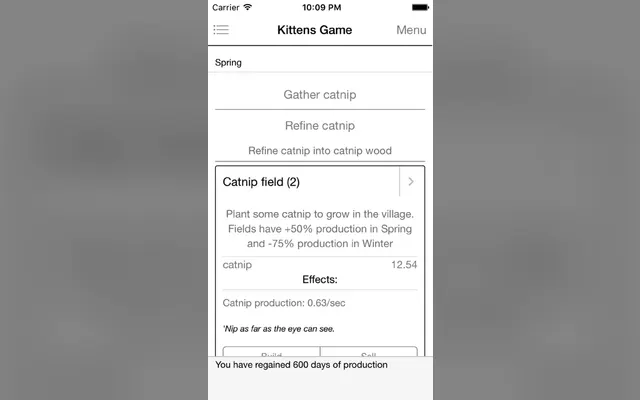
Kittens Game opens with 'Gather catnip.' The first building, the Catnip Field, has an unlockRatio of 0.3 in buildings.js, so it appears once you hold 30% of its price, well before you can buy it. The Hut and other early buildings use the same rule.

Seeing a goal at 30% gives the player something to work toward and time to read its tooltip before the decision. By the time it is affordable, they already know what it does.

Copy the ratio. Showing the next thing early is the cheapest onboarding you can build, and one number tunes it.

Watch out for: Reveal too early and the screen fills with things the player cannot use. Kittens Game reveals buildings gradually as resources grow; keep yours to two or three visible goals.

05

Antimatter Dimensions: best for a guided highlight that steps aside

Platform: Browser, Steam, Mobile · free

Antimatter Dimensions has a real tutorial, but it is a glow, not a wall. Its tutorial.js highlights the 1st Dimension button, then the 2nd once you have 100 antimatter, then Tickspeed after you buy a 2nd Dimension, Dimension Boost at 20 4th Dimensions, and Antimatter Galaxy at 80 8th Dimensions. The How to Play button is emphasised until your first Dimension Boost.

The How to Play modal, defined in h2p.js, has dozens of entries, each with an unlock condition, so the help only ever shows topics you have reached and stays searchable. The tutorial switches off entirely for players who have completed the game.

Copy both halves: a single highlighted next action, and a reference that grows with the game.

Watch out for: Help that is always available is easy to ignore. The emphasis on How to Play only lasts until the first boost; time-box your nudges the same way.

06

Trimps: best for unlock messages written as story

Platform: Browser · free

Trimps announces each unlock in its log with a line of story from its config.js. Huts arrive with 'Doesn't seem like all of these little guys will fit in your ship. Luckily, you remember how to make small huts for shelter.' Later, enemies drop books: 'You found a book that will teach you how to upgrade your Shield!'

The message explains why the new button exists and what problem it solves, in one sentence, at the moment the player needs it. That is the textbook recommendation, 'Introduce mechanics exactly when players need them,' as the GDevelop blog puts it, done in a log.

Copy the format: problem, then solution, then the button.

Watch out for: Log messages scroll away. Keep important unlock text available in a tooltip or help panel too, for players who missed it.

07

The Prestige Tree: best for a map that grows one node at a time

Platform: Browser · free

The Prestige Tree starts with one node, P. In its layers.js the next layers have layerShown conditions tied to unlocking the one before, so the tree reveals itself branch by branch. The Modding Tree framework it uses also supports a 'ghost' state that reserves a node's space before showing it, per the framework's docs.

A visible structure that fills in is a strong motivator: the player can see there is more, and roughly where it will appear.

Copy it for any game with layered systems. Our Modding Tree tutorial shows how layerShown works.

Watch out for: Tree layouts tempt designers to show everything as locked nodes. A wall of locks is intimidating; reveal one or two ahead, not the whole tree.

08

Increlution: best for forgiving systems that protect learners

Platform: Steam · paid

Increlution is a time-management incremental with a queue of jobs and constructions. Its Steam page spells out one design choice: 'When your queue is empty, the game pauses automatically, so you don't lose any of your precious time.'

That single rule removes the worst onboarding failure in timed games: a new player who does not yet understand the queue does nothing and loses a life to the clock. Learning becomes free.

Copy the principle. Wherever a new player can waste a resource by not knowing what to do, pause, cap or refund until they act.

Watch out for: Auto-pausing changes pacing for experienced players too. Consider making it a setting once players are past the first few runs.

09

NGU Idle: best for unfolding features plus a place to ask

Platform: Steam, Browser · free-to-play

NGU Idle's Steam page promises 'Unfolding features the further you progress' and points to 'A 9000+ member Discord to ask your newbie questions and brag about your numbers going up.'

Big idle games cannot teach everything in-game, and NGU does not try. Systems arrive gradually, and a community is named as part of the onboarding. Players who get stuck have somewhere to go that is not a closed tab.

Copy the honesty. If your game is deep, say where help lives, and link it from the menu.

Watch out for: A Discord is not a substitute for clear UI. Use the questions people ask there as a list of things to fix in-game.

10

Tower Wizard: best for a first goal shown as a progress bar

Platform: Steam · paid

Tower Wizard's opening screen, as its Steam trailer shows, is a 'Tower Requirements' bar with a target of 30 and a greyed-out 'Build Tower' button. The bar fills, the button lights, and the first click builds the tower; the Study panel with its first skills follows.

A disabled button with a visible bar tells the player the goal, the cost and the action before they have read anything. It is the smallest possible tutorial.

Copy it for your first five minutes: one goal, one bar, one button that wakes up.

Watch out for: A greyed-out button with no visible progress looks broken. Always pair a locked action with the bar or number that unlocks it.

11 · Ours

Mushies!: best for an opt-in guided tutorial with a spotlight

Platform: Browser, Steam

Mushies! is the cozy mushroom-village clicker made by this site's maintainer, so treat this as a case study, not a neutral pick. It opens with a character, Elder Rhizome, offering a choice: 'Yes, I'd like a tutorial.' or 'Shhhh, I don't need your help.' Players who accept get short tasks: 'Click the mushroom 5 times!', 'Grow a Shaker from the Shroom Shop!', then drag and scroll to move the camera.

The Godot code dims the screen and cuts a highlighted hole over the current target, and during instruction lines only that element is clickable. During task lines the block lifts so players can click, pan and zoom freely. A skip button asks for confirmation, and the tutorial ends with a choice of blessing: +50% click power or a free Shaker.

It is built in Godot with a free browser demo, so you can try the flow yourself.

Watch out for: Mushies is still in development, so this flow may change before release. Blocking clicks outside a spotlight is powerful but frustrating if a line drags on; keep instruction lines short and the skip visible.

How to choose an onboarding approach

Most idle games need a mix. Start from the first screen and work outward.

01

Match it to your first screen

If your opening can be one button, do that and let reveals teach the rest, like A Dark Room or Universal Paperclips. If your first screen has several systems, add a single highlighted next action like Antimatter Dimensions, or an opt-in guided flow like Mushies. Never open with a page of text; players come to act, not to read.

02

Match it to your genre's failure mode

In timed or run-based games the risk is wasting resources, so add forgiveness like Increlution's auto-pause. In open-ended idlers the risk is getting stuck, so add rescue triggers like Paperclips' fallback unlock. In deep games the risk is being overwhelmed, so reveal the next goal early like Kittens Game and keep a growing help panel.

03

Match it to your data

Write down every unlock and its trigger in a list, then watch three new players and note where each one paused. The fix is almost always moving a trigger, adding a preview or adding a fallback, not adding text. Antimatter Dimensions' tutorial states fit in about 30 lines of code because the thresholds do the work.

Write your unlock list tonight

List every button, panel and resource in your game in the order a new player should meet them, and next to each write the exact trigger: a number, a purchase or an event. If any two appear at the same moment, split them. If any can be missed, add a fallback. That list is your tutorial.

When new players can get through your first ten minutes alone, list the game on IncrementalGames.org for free. If you want more of those new players at launch, the optional Get featured placement adds a labelled Featured card on the home page, game pages and best-of lists.

List your game free →

Common questions

Do idle games need a tutorial?

Usually not a separate one. Many of the best known, like A Dark Room, Universal Paperclips and Candy Box 2, open with one button and reveal new features as the player reaches them. Deeper games add light guidance, like Antimatter Dimensions' highlighted next button.

How do you teach mechanics in an incremental game?

Introduce each mechanic when the player first needs it, show the next goal before it is affordable, and tie each unlock to a short message explaining why it exists. Kittens Game reveals buildings at 30% of their price; Trimps explains each unlock with a line of story.

Should a tutorial be skippable?

Yes. Returning players and genre veterans want to play immediately. Mushies offers the tutorial as a choice up front and confirms before skipping; Antimatter Dimensions turns its tutorial off for players who have completed the game.

How do I stop new players getting stuck in my idle game?

Give every unlock a fallback trigger. Universal Paperclips opens its computing panel at 2,000 clips, or immediately if the player has no clips to sell, no wire and no money for wire. Also pause or cap anything a confused player could waste.

Sources